> For the complete documentation index, see [llms.txt](https://wiki.blocklords.com/llms.txt). Markdown versions of documentation pages are available by appending `.md` to page URLs; this page is available as [Markdown](https://wiki.blocklords.com/game-mechanics/world-map/cities/city-buildings/city-hall.md).
# City Hall
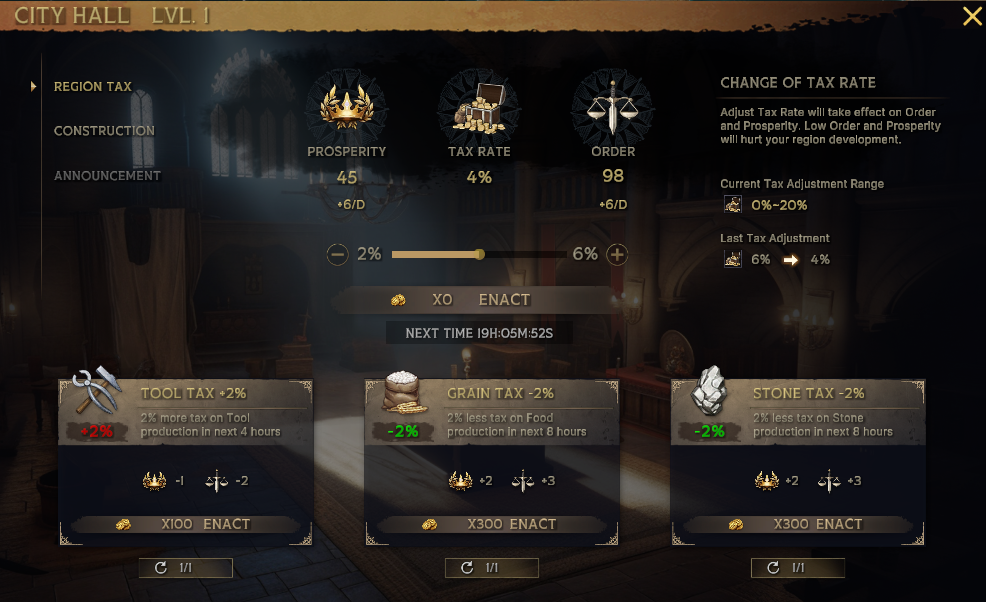
Picture the City Hall as your personal war room for all things governance. It’s a comprehensive dashboard allowing you to adjust tax policies, launch building projects, and even make important Ruler’s announcements to your residents and allies.
* **Main Administrative Center**: As the main building, the City Hall is where key decisions affecting the entire region are made.
* **Tax Management**: One of its primary functions is to adjust the region's [tax rates](/game-mechanics/ruling/claiming-region/region-attributes/taxes.md), allowing you to balance economic growth with the satisfaction of your populace.
* **Regional Metrics**: At the City Hall, you can check vital statistics such as [Prosperity](/game-mechanics/ruling/claiming-region/region-attributes/prosperity.md), [Order,](/game-mechanics/ruling/claiming-region/region-attributes/order.md) and [Population](/game-mechanics/ruling/claiming-region/region-attributes/population.md), which are essential indicators of your region's health and stability.
* **Tax Policies**: It also enables you to enact specific [tax policies](/game-mechanics/ruling/claiming-region/region-attributes/taxes.md), giving you strategic control over the economic dynamics of your region.
* **Naming Rights \[TBD]**: The City Hall offers the unique privilege of naming the region, adding a personalized touch to your dominion.
* **Resource Allocation**: Utilize resources from the [Coffers ](/game-mechanics/world-map/cities/city-buildings/coffers.md)to enhance the Prosperity and Order of the region, ensuring its growth and well-being.